Registering pdfMachine
Getting a license key
Installation of pdfMachine defaults to pdfMachine white. Registration with a purchased key is required to use any of the other pdfMachine editions. A banner will be placed on each page of a PDF where a feature has been used that is not covered by the particular edition of pdfMachine registered. Licenses for the other editions can be purchased and entered into pdfMachine.
Enter Registration Details
From the pdfMachine options window, select the Registration tab. You can go straight there from the Start menu by choosing 'Enter pdfMachine Registration Details"
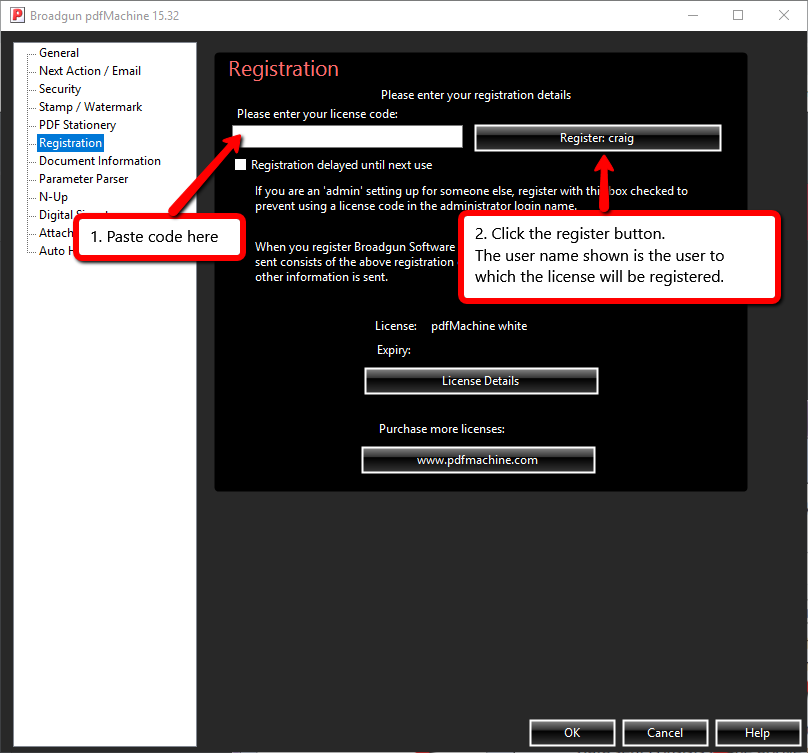
Registration steps:
Step 1 After purchasing pdfMachine you will receive an alphanumerical key code via email. It will look something like: XTXB0X6A71OJ-3XNBIM2XXI3TX
Step 2 Copy and paste the key code into the registration box and click “register”.
Registration help can be found here.
License - This shows what type of license you have purchased.
Expiry - This is the version protection expiry date. When a new version of the software is released, if your version
protection has not expired, you can install the new version. Otherwise you have to stick with the old one.Otherwise you have to stick with the old one. Older versions are not supported and may not work well with more modern operating systems, updates and applications.
Registration delayed until next use - You will only see this if you are running pdfMachine in admin mode. (e.g. right
click, run as "Administrator"). This is helpful if you are installing on behalf of someone else and don't want
to use a license code for your own user account. e.g. you are an administrator, logged on under your admin account, you
register the software on behalf of the regular user of the machine. After you register and exit, the regular user logs in and
starts pdfMachine. pdfMachine will then be registered under the "regular user" account.
If the box is not checked the Register button will display "Register:username". When clicked the license will be
tied to that username. If you check the box the Register button will change to display "Registration delayed until next use".
When clicked the license will not be used. It will be stored and the license will be tied to the next user who starts
pdfMachine.
License Details - This button will display a web page showing the license information for keys that have been registered within pdfMachine. This includes a list of keys used and which users and devices have used those keys. This allows you to see all registered users when you have a multiple-user key.