Remote desktop for Windows End-to-end encrypted
BROADGUN REMOTE
BROADGUN REMOTE is a fast, end-to-end encrypted way to share your screen with someone - or connect to their PC to help them out. Sessions are invitation-based and can be ended at any time, making it ideal for support, demonstrations and quick help sessions.
No installer is required. Download and run BroadgunRemote.exe. To connect to another PC, create a viewer license on the BROADGUN REMOTE signup page. Current version 0.1.59 · Release notes.

How it works
- Run BROADGUN REMOTE on both computers.
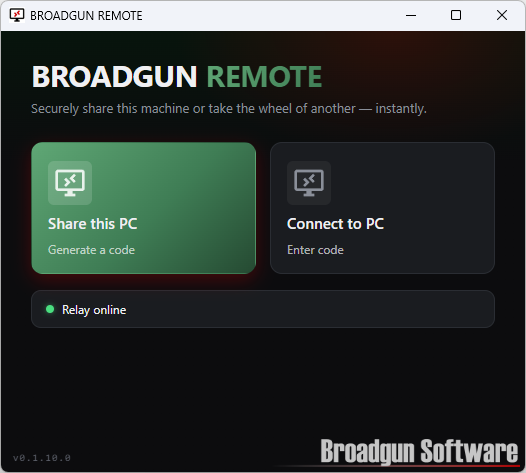
- The person sharing their PC clicks Share this PC.
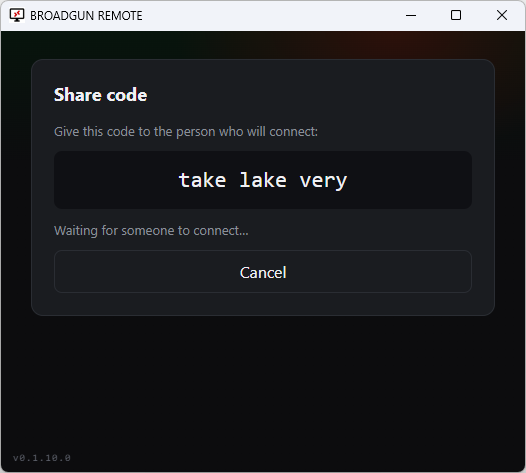
- They give the three-word code to the person connecting.
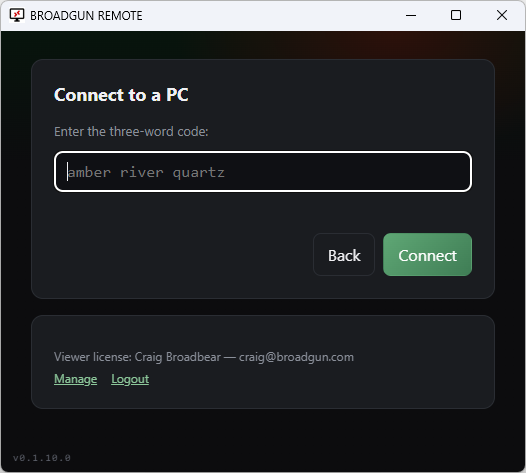
- The viewer enters the code and the remote session starts.
BROADGUN REMOTE screenshots
A quick look at starting a session, sharing a code, and connecting to another PC.
End-to-end encryption
Every session is encrypted between the two computers taking part, with fresh one-time keys each time. The relay cannot decode any of it.
Bi-directional file transfer
Send files in either direction during the session - copy files from the remote PC, or push files to it without leaving the app.
Bi-directional voice, control and chat
Speak both ways during the session, use mouse and keyboard control, and exchange written messages with built-in chat.
Simple session codes
Connect using easy-to-read three-word codes instead of long IDs or complicated setup steps.
Signup options and costs
Only the person viewing or controlling another computer needs to sign up for a BROADGUN REMOTE viewer license. People sharing their PC do not need an account or license, so each licensed viewer can support unlimited sharers.
Free
US$0
For personal use only.
Solo
US$36/year
For one viewer.
Team 5
US$72/year
For up to 5 viewers.
Team 10
US$120/year
For up to 10 viewers.
End-to-end encryption
The relay can connect you, but it cannot watch you
BROADGUN REMOTE protects every remote-control session with end-to-end encryption. When a viewer joins using the familiar three-word session code, both applications perform an X25519 key exchange and derive fresh session keys that exist only on the sharer and viewer machines.
The relay still does the simple job it was designed for: pairing the two sides and forwarding packets. It cannot decode screen images, keyboard or mouse input, chat messages, file-transfer chunks or private session control messages, because those are encrypted before they leave each device and decrypted only after they reach the other device.
Each connection gets unique, one-time encryption keys. Even if the same three-word code is used again later, the key exchange creates new key material for that session. Message authentication is built in, so altered or forged packets are rejected instead of being displayed or replayed.
Check the security phrase
For the strongest protection against an actively malicious relay, BROADGUN REMOTE shows a three word security check phrase on both computers:
cobalt meadow anchor
Read the phrase to each other. If both phrases match exactly, you know you are connected directly to each other cryptographically, with no man-in-the-middle in the path. If they do not match, disconnect.
In short: the relay can connect you, but it cannot watch you.
Security and control
BROADGUN REMOTE is designed for attended support. A remote session starts only when the person sharing their PC runs the application, chooses to share, and provides the three-word code to the person connecting.
The sharing user remains in control throughout the session and can stop sharing when the support call is finished. Simple codes help avoid reading out long IDs, while reducing accidental connections caused by mistyped numbers.
On top of that consent, everything the session carries is encrypted end to end between the two computers, so the contents of a support call stay between the two people on it.
What is BROADGUN REMOTE?
BROADGUN REMOTE is a TeamViewer-style remote desktop program from Broadgun Software. It has two modes: share your own PC, or connect to another PC when you have been given a session code.
The application connects through the Broadgun relay service to pair the two computers. The relay forwards the session traffic between the two clients, while the BROADGUN REMOTE application handles the screen sharing, remote input, chat and session logic. That traffic is encrypted end to end, so the relay routes packets it cannot read.
Talk while you work
BROADGUN REMOTE includes optional two-way voice audio so both sides can talk during the remote desktop session. This makes support sessions easier: explain what you are doing, ask questions, and confirm changes without switching to another app. Voice is off until someone turns it on, the other side is asked to agree before any microphone is used, and the audio runs over its own encrypted peer-to-peer connection.
Download BroadgunRemote.exe Sign up for a viewer licenseRelease notes
BROADGUN REMOTE updates itself, and the download is always the latest version.
0.1.59 - 10 September 2026
- Much better performance on slow or long-distance connections. The sharer now waits for the viewer to confirm each frame before sending the next, so a slow link shows the current screen rather than a backlog of stale updates.
- Screen updates are sent as JPEG where that is far smaller than lossless PNG (photos, video, wallpaper), while text and window chrome stay pixel-exact. On congested links the picture quality steps down gradually and recovers automatically when bandwidth returns.
- A low-resolution preview of the whole screen appears within a moment of connecting, before the full-detail image finishes arriving.
- The remote mouse pointer is now shown on the viewer with its real shape (arrow, text cursor, hand and so on). Previously it was missing on most PCs.
- The relay reports congestion back to the sharer, so a fast sharer no longer floods a viewer on a slow connection.
- Mouse movement from the viewer is sent more efficiently.
- New
--versioncommand-line switch prints the version.
0.1.52 - 5 August 2026
- Sharper text on the viewer: the remote screen is shown at an exact 1:1 or 2:1 pixel ratio when it fits, and scaled with a better algorithm when it does not.
0.1.51 - 4 August 2026
- End-to-end encryption for every session. The sharer and viewer perform an X25519 key exchange and derive one-time session keys; the relay pairs the two PCs and forwards traffic it cannot read.
- Three-word security check phrase shown on both PCs so you can confirm there is no man-in-the-middle.